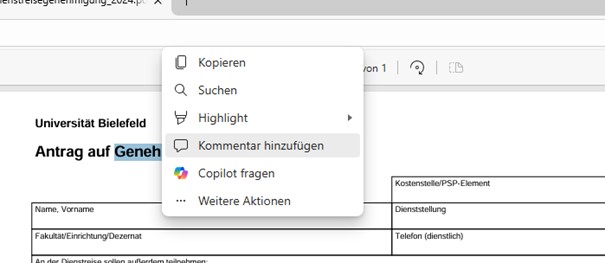
Gewünschte Textstelle für einen Kommentar durch Doppelklick markieren und auf Kommentar hinzufügen klicken.
Kommentar eingeben und mit einem Klick auf den Haken speichern.
Vorhandene Kommentare werden durch ein gelbes Textsymbol angezeigt.
Durch einen Rechtsklick die gewünschte Stelle für neuen Text auswählen und auf Text hinzufügen klicken.
Farbe des Textes, Schriftgröße und Ort auswählen und im Anschluss den Text eingeben.
In der Toolauswahl oben links auf Zeichnen klicken und mit dem Stift an der gewünschten Stelle unterschreiben.